Free to start
Every document leaves a paper trail.
Share a PDF - or turn it into an interactive, page-turning flipbook - and see who read it: how far they got, how long they stayed, page by page.
Drop your PDF here
or click anywhere in the tray to browse
PDF only · max 20MB
✓ encrypted at rest ·✓ expires when you choose ·✓ free account in seconds
The part nobody else does
Then watch it being read.
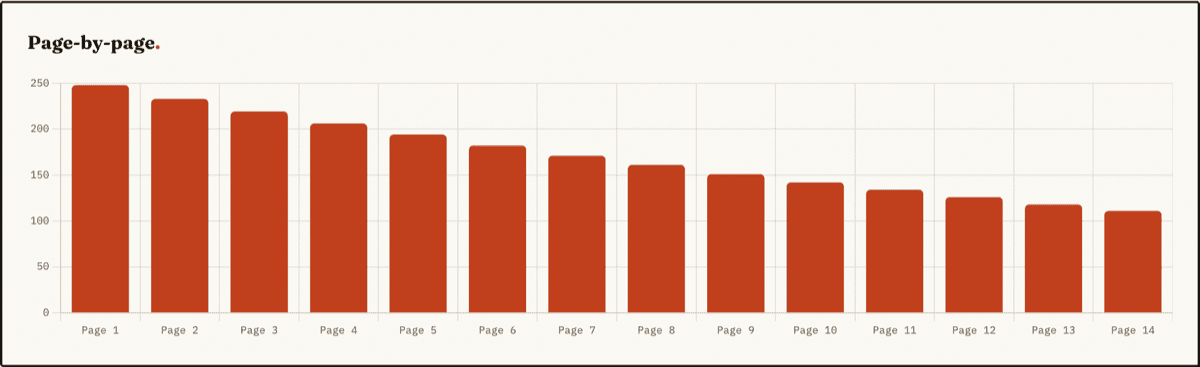
Every page turn is timed. See how far each reader got, where they stopped, and who came back - without storing a single IP address.
See the readership tourWant the full walkthrough? Read the guide to seeing who read your PDF.
Drop a PDF
Drag it onto the tray. It's encrypted before it touches disk - then claim it with a free account to share.
Set the rules
Password, expiry, download permission, email gate, reading mode. Your document, your terms.
Read the readership
The funnel, the timings, the returning readers - your link reports back on everything that happens to it.
Who uses FileDroppr.
Anywhere a PDF carries weight and you need to know it landed. If you send documents that matter, the readership report turns "I sent it" into "they read pages 1 to 14, twice."
Sales proposals
Know whether a prospect read your proposal before the follow-up call - and which page they spent the longest on.
Investor pitch decks
See if an investor opened the deck, how far into the financials they got, and whether they came back for a second look.
Client deliverables
Confirm a report or design was actually read, not just received - and spot the sections that need a walkthrough.
Compliance & policy docs
Evidence that a policy was opened and read through, with no visitor IP addresses stored anywhere.
New to this? Read how to see who read your PDF.
The fine print.
Secure PDF Sharing
Share PDFs securely with end-to-end encryption and privacy-focused design.
File Expiry Options
Set expiration dates for your PDFs to control how long they are accessible.
Detailed Analytics
Track page-by-page views, time spent, device types, and geographic data.
QR Code Generation
Easily generate QR codes for quick and convenient PDF sharing.
Password Protection
Add an extra layer of security by protecting your PDFs with passwords.
Encrypted at Rest
All files are encrypted while stored on our servers for maximum security.
In-Browser Viewing
View PDFs directly in your browser with beautiful flipbook effects.
Embed Anywhere
Easily embed your PDFs into any website or blog with a simple snippet.
Reader Comments
Let readers leave feedback on the document itself - private to you or public to every viewer.
Sharing something confidential? See how secure PDF sharing works.
Security & lead capture, built in
Every page is tiled with the viewer's identity, and downloaded copies are stamped for good.
Give a link a view budget or a deadline and it deletes itself - your readership record survives.
Put a custom form in front of any PDF and turn every reader into a contact in your dashboard.
Four ways to read
Choose how your PDFs are displayed to your audience - from a clean reader to a true page-turning flipbook
Standard
Clean, simple page-by-page viewing
Flipbook
Drag-to-turn 3D book with your branding
Swipe
Horizontal swipe navigation
Magazine
Two-page spread layout
The flipbook, magazine, and swipe modes turn a flat PDF into an interactive flipbook - styled with your background, logo, and page effects, embeddable on your site, and tracked page by page.
Explore the PDF flipbook maker