The catalogue
A link tells you nothing.
A FileDroppr link reports back.
Send a PDF and find out what actually happened to it - who opened it, how far they read, where they stopped, and whether they came back.
Readership.
Every document becomes a ledger of how it was read.
Most file tools stop at a view counter. FileDroppr's viewer measures the reading: every page turn is timed, every visit is recorded, and your readership page turns it into answers - not numbers.
The centrepiece is the read-through funnel: the percentage of readers who reached each page. If your proposal loses everyone at page 4, the funnel says so - and that is where you fix it.
- a.
Page-by-page reading time
The in-app viewer times every page in every mode. See where readers linger and where they skim.
- b.
Readers, not IP addresses
Each visitor becomes a stable, pseudonymous Reader #214. You can tell that the same person came back three times - a real interest signal - while we never store a single IP address.
- c.
Know which channel worked
QR scans, share emails, embeds, and direct links are attributed separately, alongside referrers, devices, browsers, countries, and reading hours.
- d.
Names on the register
Turn on the email gate and readers sign in before the document opens - your sessions go from "someone in Berlin" to [email protected], pages 1-14.
- e.
Hear about it as it happens
A live "reading now" indicator, optional email notifications when someone opens your document (at most one per hour), and a CSV export when you want the raw ledger.
The real dashboard
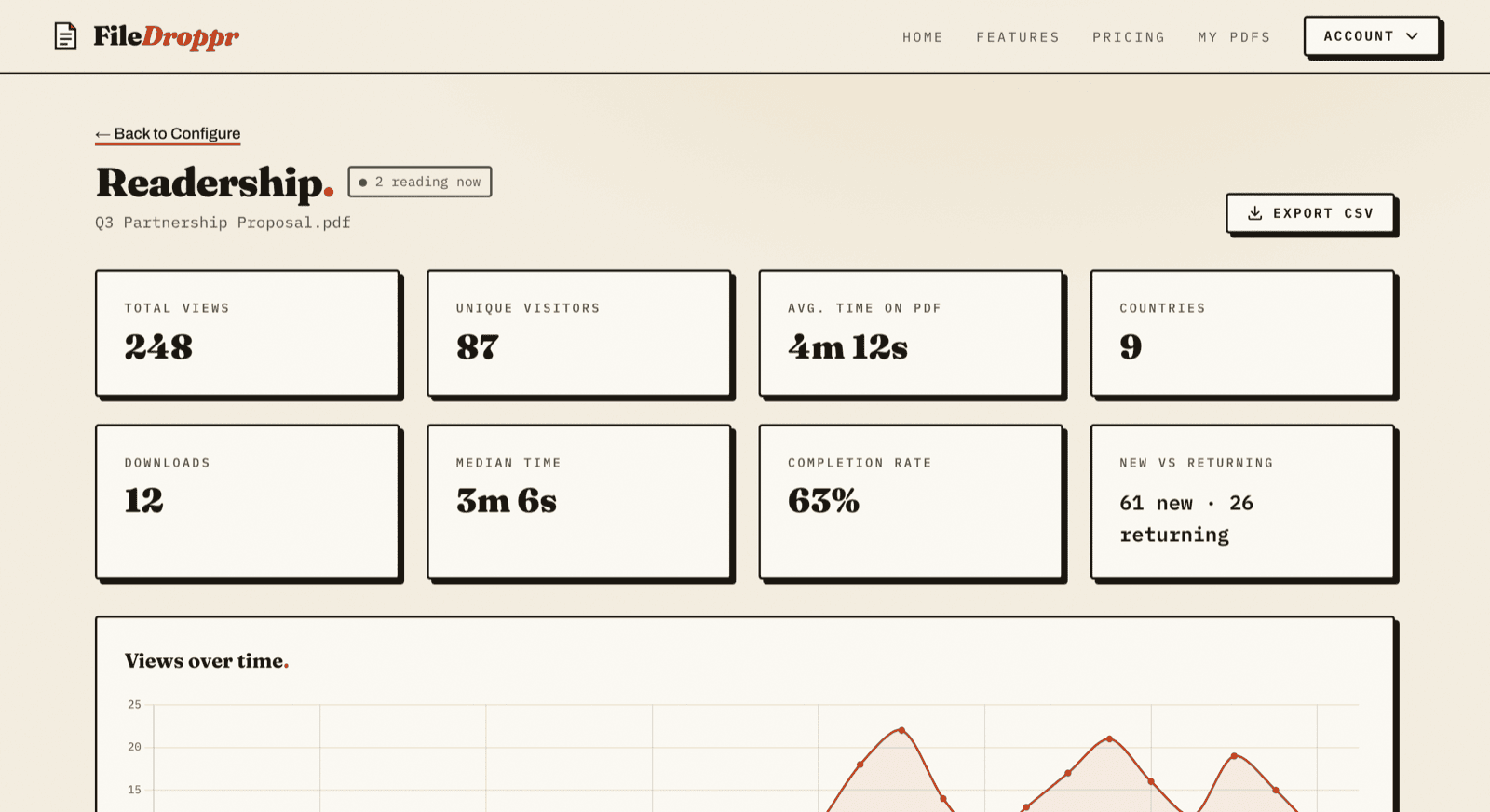
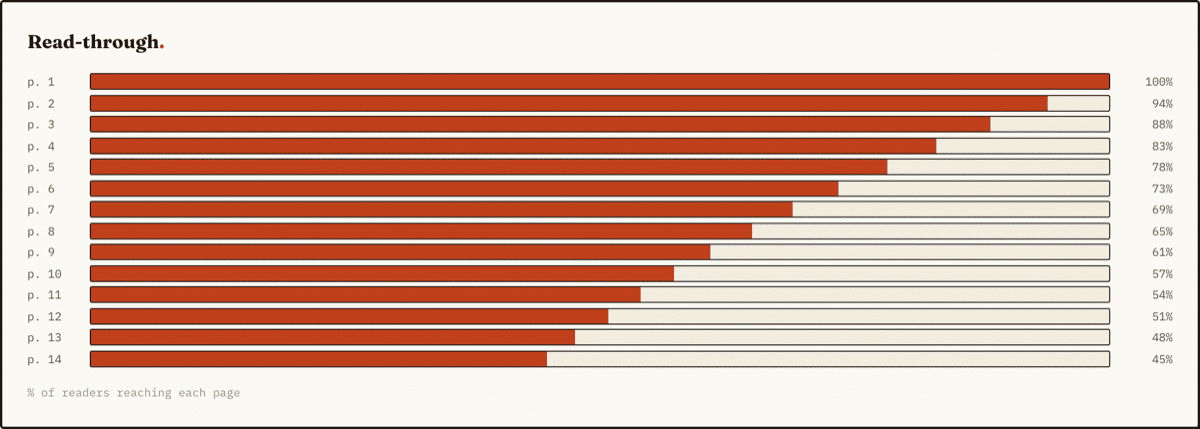
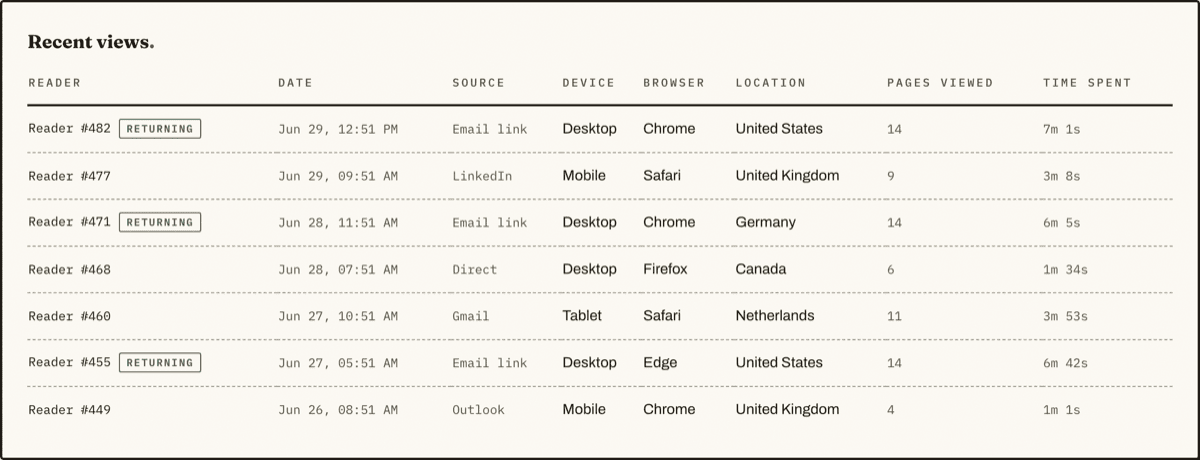
The genuine FileDroppr readership dashboard, shown here with sample data - not an illustration.
Four ways to read
Standard
A clean page-at-a-time reader with crisp device-pixel rendering, keyboard navigation, and a scrubber for flicking to any page. The default that never gets in the way.
Flipbook
A true book around a centre spine: drag pages with a finger or mouse and they curl in 3D and stay where they land. Zoom, fullscreen, page thumbnails, and links straight to a page - styled with your background, logo, and page effects.
Swipe
Built for phones: drag pages horizontally with snap-back physics and rubber-banding at the ends. The next page slides in behind your thumb.
Magazine
Two-page spreads with a centre spine shadow, like an open issue on a desk - the right reading for lookbooks, zines, and anything laid out as facing pages.
Every mode renders in-app - so page-by-page readership works in all of them. You choose the mode readers get; on phones the flipbook adapts to a full-width single page automatically.
You set the terms.
- 01
Password protection
Put the document under seal. Readers enter the password once; verification happens server-side and the password itself never appears in any URL.
- 02
Expiry, on your schedule
Pick a lifetime and the link dies on schedule, or keep it indefinitely on Pro. Expired documents return "Gone" immediately and the encrypted file is swept from disk within the minute.
- 03
Download control
Hide the download button and refuse direct download requests, per file, with a one-click toggle right from your library. Viewing in the browser keeps working.
- 04
The email gate
Require readers to sign the register before the document opens. Enforced on the server - a made-up address doesn't pass - and every session is then attributed by name.
- 05
View notifications
Get an email the moment someone opens your document, capped at one per hour per file so a popular link doesn't flood your inbox. Your own visits never count.
- 06
QR codes, email & embeds
Every share surface is built in: a generated QR code for print, share-by-email with a personal note, and an embed snippet for your site - each one separately attributed in readership.
- 07
Your brand on every page
Set a background colour, gradient, or image; add your logo with a link to your site; tune page shadows, corners, and turn speed - edited against a live preview, applied everywhere the document is read.
- 08
Interactive hotspots
Draw clickable areas on any page that open a link, jump to another page, or play YouTube/Vimeo video, images, and audio. Every activation is counted, so you know which call-to-action actually got clicked.
- 09
Your own domain
Share from docs.yourcompany.com instead of a third-party link. One CNAME record, automatic HTTPS, and your links, QR codes, embeds, and share emails all switch over - readership included.
- 10
Reader comments
Turn on reader comments and readers can respond on the document itself - each comment private to you or public to every viewer, the commenter chooses. You hide, delete, or re-scope any of them, and get an email when new feedback lands.
- 11
Viewer protection
Block right-click saving, printing, and text copying with one per-document toggle - and on Pro, add screenshot deterrence: the pages blur the moment the viewer window loses focus. The full toolkit is on the secure PDF sharing page.
- 12
Read receipts
Let readers mark a document as received. Each confirmation is recorded alongside their reading session in your readership report - so "I sent it" becomes "they confirmed it, and read to page 14".
- 13
Google Analytics on your links
Add your GA4 measurement ID and every visit to your share links flows into your own Google Analytics property - alongside the page-by-page readership FileDroppr already reports.
- 14
Self-destructing links
Give a link a view budget and it deletes itself when the count is spent - one view for one-time delivery, or any number you choose. The document disappears; your readership record of every read survives. Details on the self-destructing links page.
- 15
Per-viewer watermarking
Tile every page with the viewer's identity and a timestamp, and stamp downloaded copies permanently into the PDF itself - so a leaked page points straight back to its source. See PDF watermarking.
- 16
Lead capture forms
Put a custom form - up to five fields, from name and email to phone and company - in front of the document, and restrict viewing to the email domains you choose. Every captured contact lands in your readership report and CSV export. See turning a PDF into a lead magnet.
- 17
Custom CTA & extended branding
Put your own call-to-action button in the viewer toolbar - "Book a call", linked wherever you like - and take the branding past the flipbook: your accent colour, a light or dark toolbar theme, and your logo and badge positioned where you want them.
- 18
Outbound webhooks & Slack notifications
Get a signed HTTPS POST at your own endpoint the moment a document is viewed, downloaded, gated, commented on, receipted, or burned - or point one at a Slack channel for instant formatted pings, no Slack app required. Details on the PDF webhooks page.
Sealed & filed
- Encrypted at rest
- Files are encrypted with AES-256-GCM in a chunked streaming format - tamper, truncation, and reorder evident - and are never held in memory whole, even at the 2GB size cap.
- Per-user keys
- Each account has its own encryption keys, wrapped by a master key that never touches the database. Anonymous uploads get a fresh single-file key.
- No IP addresses
- We never store visitor IPs. Readers are identified by a salted one-way hash, countries are derived in-flight, and the address is discarded - analytics without surveillance.
- Expiry you control
- Set any link to expire - an hour, a day, a year - or keep it indefinitely on Pro. Expired files are swept from disk within the minute, so nothing lingers unless you want it to.
- Sessions, not trackers
- Readership is first-party measurement of your own document, inside our viewer. No third-party scripts, no cookies following anyone across the web.
Honest small print: a reader's browser must receive the pages to display them - download controls deter, they don't DRM.
See it on your own PDF.
Drop a file on the homepage, claim it with a free account, and watch the readership roll in.
Comparing tools? See the DocSend alternative page, or read how to see who read your PDF.